Your documents
work for you now.
Scan anything. OneScribe extracts the data, tracks your spending, alerts you before deadlines, and briefs you every morning.
83 document types. 100% on-device AI. Zero cloud.
Receipts → Spreadsheets
Vendor, total, items, category. Auto-extracted.
Contracts → Alerts
Renewal deadlines, auto-renew flags. Never miss one.
Cards → Contacts
Business cards become contacts in one tap.
Search → Answers
"Receipts from last month over $50." Just ask.
Open OneScribe
every morning.
A personalized push notification summarizes your document intelligence — upcoming deadlines, spending trends, action items — before you've had coffee.
OneScribe
Daily Briefing · 8:00 AM
Good morning! Your car insurance expires in 12 days, you spent $347 on dining this week, and your lease renewal deadline is Friday.
Tap to see your full briefing →
Scan. Understand. Act.
Scan anything
Point your camera at any document. Receipts, contracts, medical records, boarding passes — 83 types recognized instantly.
Free — unlimited scans
AI extracts everything
On-device AI reads your document and builds a structured Data Card — amounts, dates, names, clauses, line items.
Preview free · Full access with Pro
It works for you
Alerts before deadlines. Spending tracked. Morning briefings. Your documents become your personal assistant.
Pro feature
See it to believe it.
Every scan produces a structured Data Card. Not just text — real, typed, searchable data.

Receipt → vendor, total, items, warranty
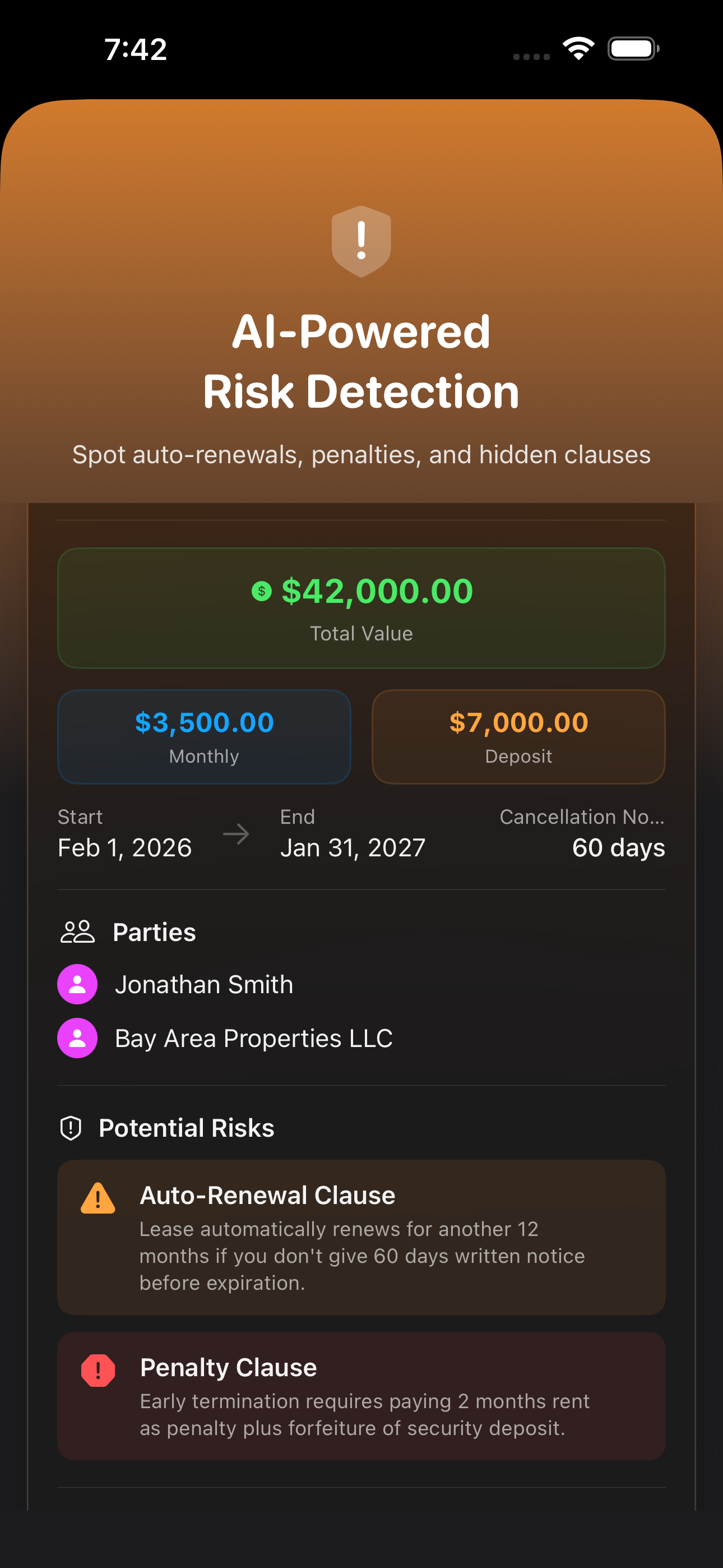
Lease → clauses, renewal date, risk flags

Ticket → date, venue, calendar sync
Receipts · Contracts · Medical · Boarding Passes · Prescriptions · Warranties · Tax Docs · Invoices · Meeting Notes · and 74 more
Everything you need.
Nothing you don't.
83 Document Types
Each type gets its own structured Data Card. Receipts extract line items. Contracts flag auto-renewal. Medical records pull dosage and provider. Not OCR text — real data.
100% On-Device
Powered by local AI models built right into the app. Every scan, every analysis, every search happens on your iPhone. No Apple Intelligence required. Nothing uploaded. Nothing shared. Ever.
Talk to Your Documents
"What are the cancellation terms?" "Is my deductible covered?" Ask questions about any document and get instant answers. Full document chat with 5 AI personas.
Cross-Document Intelligence
Spending trends across receipts. Vendor frequency. Warranty coverage gaps. Contract overlap detection. Your document library becomes a knowledge base.
Proactive Alerts
Contract expiring in 7 days. Warranty ending next week. Immigration document renewal in 90 days. OneScribe watches your deadlines while you sleep.
Smart Exports
Contracts export as calendar events. Business cards as contacts. Receipts as spreadsheets. Meeting notes as reminders. 8 smart export modes via the iOS Share Sheet.
Start free. Upgrade when ready.
Unlimited scans, always free. Pro unlocks the full intelligence layer.
Monthly
Less than a cup of coffee
- Full Data Cards
- Document Chat
- Smart Alerts
- Daily Briefings
- Smart Exports
- Natural Language Search
- 7-day free trial
Lifetime
One-time purchase. Yours forever.
- Everything in Pro
- All future updates
- No subscriptions. Ever.
- Pay once, own it
Always free: Unlimited scans · PDF export · Data Card preview · Document reading
Stop scanning.
Start understanding.
Every document you scan makes OneScribe smarter. Start your free trial and see what your documents have been trying to tell you.

Available on iPhone & iPad · Requires iOS 26 · No Apple Intelligence required